
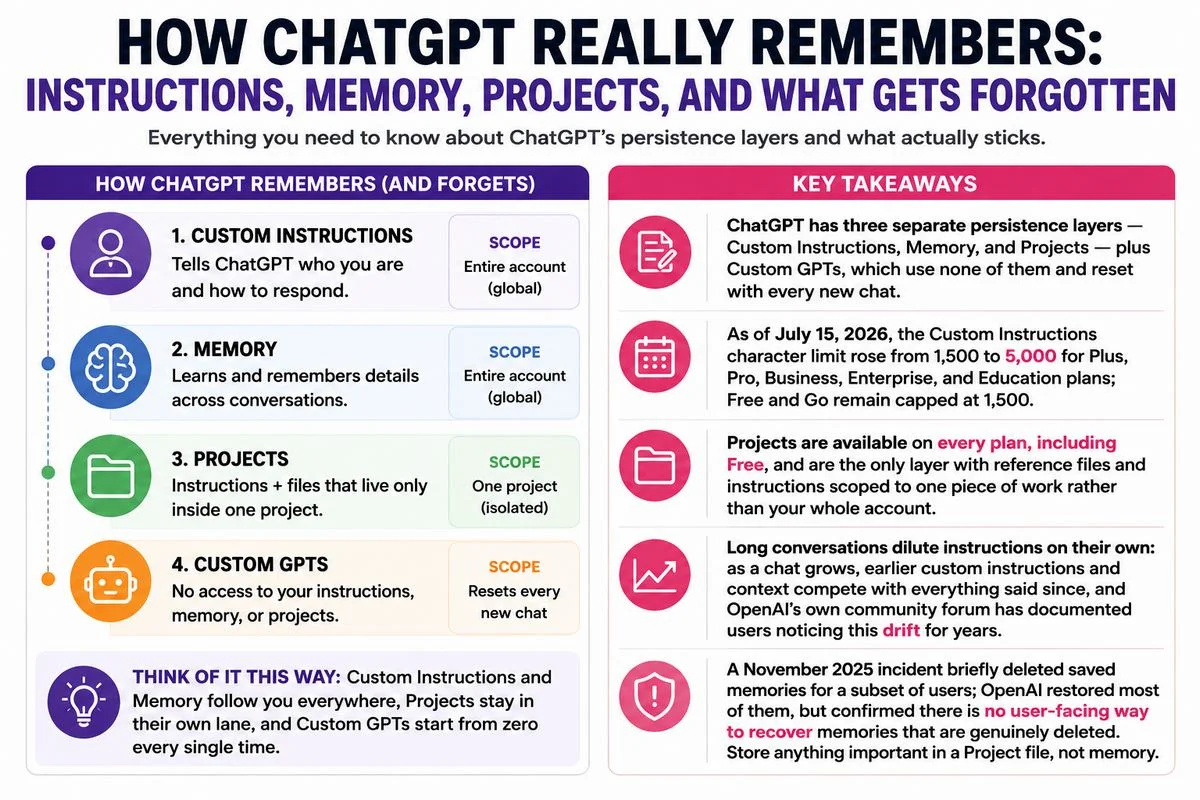
ChatGPT doesn't have one memory system. It has three, and they don't overlap the way most people assume. Custom Instructions is a static text box that applies to every chat. Memory is a dynamic profile ChatGPT builds from what you've told it, and it can drift, contradict itself, or fill up. Projects is the one built for exactly the problem in the headline: a workspace that holds instructions and reference files scoped to a single piece of ongoing work, so you stop re-explaining the brief every Monday morning. If ChatGPT is ignoring rules you set earlier in a long conversation, or applying one client's style to another client's draft, the fix is usually to move that work into a Project rather than trying to cram more into Custom Instructions or hoping Memory sorts it out.
There's a fourth option people often confuse with the others: Custom GPTs.
They're worth ruling out early, because OpenAI's own documentation states plainly that GPTs do not use saved memory, custom instructions, or previous conversations.
Every interaction with a Custom GPT is stateless, regardless of your account-level memory settings. If you built a GPT expecting it to remember past chats, that's the actual cause, not a bug.
Key Takeaways
|
Why ChatGPT actually “forgets”
The frustration is real, but “forgetting” is the wrong mental model for most of what's happening. ChatGPT isn't losing your instructions the way a person forgets a conversation. It's weighing them against everything else in its context window, and several structural issues make that weighting unreliable for anything beyond a short chat.
The context window fills up
Custom instructions and saved memories are injected into the model's context alongside your conversation. As a chat runs longer, that context fills with new messages, and OpenAI's own developer community has flagged for years that instructions set at the start of a session visibly lose influence by the fifth or sixth exchange. The instructions aren't deleted from the account; they're just diluted by everything said since, which is why a rule that worked for the first few replies can quietly stop applying by the end of a long session.
Custom GPTs never had the context to begin with
This is the one true dead end. A Custom GPT runs on the system prompt its builder wrote and nothing else — no saved memories, no custom instructions, no memory of earlier chats with that same GPT. If you're relying on a GPT for continuity across sessions, that continuity doesn't exist by design.
Memory has a ceiling, and it can drift
Saved memories accumulate as short notes, and the store isn't unlimited. When it fills, ChatGPT stops adding new memories until older ones are cleared or updated, and OpenAI's April 2025 redesign was specifically meant to fix an older problem: memories that quietly contradicted each other, such as one note saying you're training for a marathon and a later one saying you sprained your ankle. The newer system updates memories automatically rather than leaving stale, conflicting entries in place, but it still isn't infinite and it still isn't a substitute for something you need to be permanently and reliably true.
Memory can genuinely disappear
This part isn't hypothetical. Between November 6 and 7, 2025, OpenAI's status page confirmed an incident in which a subset of users' saved memories were deleted or shown blank. Most were restored through targeted recovery, but OpenAI's own guidance is that there is no user-facing way to recover memories that were genuinely deleted — turning memory back on doesn't bring lost entries back. If a piece of context is the kind of thing that would derail a project were it lost, memory alone is the wrong place to keep it.
A shared login mixes profiles
If multiple people share one ChatGPT account — a small team, a family plan misused as a shared login — memory has no way to tell them apart unless each person identifies themselves every session, which most people don't. The practical result, reported by users managing shared accounts, is that one person's preferences bleed into another's responses. This is a case where Custom Instructions per Project, or separate accounts, beats relying on memory.
The three tools, side by side
Before fixing anything, it helps to know which tool is actually responsible for the behavior you're seeing. Here's how the four options compare as of July 2026.
| Feature | Custom Instructions | Memory | Projects | Custom GPTs |
|---|---|---|---|---|
| Scope | Every chat, account-wide | Every chat, account-wide (unless a Project is used) | Only chats inside that Project | Only that GPT's own chats |
| How it's created | You write it once in Settings | ChatGPT saves it automatically, or you say “remember that...” | You write project instructions and attach files | Builder writes a system prompt when configuring the GPT |
| Character / size limit | 1,500 (Free, Go) or 5,000 (Plus, Pro, Business, Enterprise, Education) | No published hard character cap, but the saved-memory store fills up over time | Several thousand characters of instructions plus attached reference files | Set by the GPT builder |
| Uses memory or chat history? | No, it's static text | Yes, that's its entire function | Project-level context, separate from your personal memory | No, stateless by OpenAI's own documentation |
| Best for | Stable voice, tone and formatting rules | Recurring personal facts, such as role, preferences and ongoing goals | One long-running piece of work with its own files and rules | Sharing a packaged assistant with other people |
Feature availability and limits as of July 2026; verify current specifics at chatgpt.com and help.openai.com, since OpenAI updates these regularly.
What actually works: put ongoing work in a Project
For anything that spans more than a couple of sessions — a client's brand voice, a codebase's conventions, a thesis, a recurring weekly report — a Project is the tool built for the job, and it's available on every plan, including Free, though paid plans raise the file ceiling per project. A Project groups chats, project-only instructions, and reference files under one workspace page, and those project instructions apply on top of your global Custom Instructions rather than replacing them. Since OpenAI's April 2026 redesign, files you upload live in a separate Library tab and get attached to whichever projects need them, so the same reference file can serve more than one project without duplicating uploads.
Setting one up
Open Projects in the ChatGPT sidebar and create a new one, named for a specific outcome rather than a vague topic — “Q3 client newsletter” beats “writing.”
Open project settings and add project-level instructions: audience, tone, formatting rules, and anything domain-specific the model needs to assume every time.
Attach only the current reference material from your Library — a brand guide, a style sheet, a codebase README — not every draft you've ever produced for that work.
Move any existing chats that belong to this effort into the Project by right-clicking them in the sidebar and selecting “Move to project.”
Start new work inside the Project going forward. Each new chat inherits the instructions and files automatically, so the brief never needs to be retyped.
One structural note if you're managing more than one client or brand: personal memories are disabled inside shared Projects, and on Business, Enterprise, and Education plans, Projects can be shared with teammates by email — which is the intended way to keep one brand's voice from leaking into another's chat, rather than depending on Custom Instructions to hold multiple personas in a single account-wide field.
Where Custom Instructions and Memory still earn their place
Projects solve scoped, file-heavy work, but they're not a reason to ignore the other two layers. Custom Instructions is still the right home for things that should be true in every single chat, regardless of project: a preferred output language, a standing rule against unnecessary preambles, a baseline reading level. With the July 2026 increase to 5,000 characters on paid plans, there's now enough room for a genuinely detailed standing brief rather than the clipped, hard-choices version the old 1,500-character cap forced. Free and Go users still work within 1,500 characters, so brevity and prioritization matter more on those tiers.
Memory is best treated as a light, evolving layer for the kind of personal facts you'd want ChatGPT to just know — your job title, a dietary restriction that affects recipe suggestions, a recurring project you mention often — rather than as a filing cabinet for anything important. It works well precisely because you don't have to manage it, and it works poorly for the same reason: it can quietly go stale, hit its ceiling, or in rare cases get wiped by a bug outside your control. Periodically opening Settings, Personalization, Manage Memories and pruning anything outdated or duplicated keeps it useful rather than confused.
Trade-offs worth knowing before you commit to this setup
There's no bulk memory export. If you want a durable backup of what ChatGPT knows about you, the honest answer is to copy the saved-memories list into your own document periodically, since OpenAI does not currently offer a native export feature.
Deleted memories don't come back. Turning memory off preserves existing entries, but clearing or deleting them is final, with no user-facing recovery path.
Custom GPTs remain stateless no matter how the rest of your account is configured, so they're the wrong choice for anything that needs to remember prior sessions.
Free-tier Projects work, but with a tighter file ceiling than paid plans, so heavy reference-document workflows will eventually push you toward Go, Plus, or a business tier.
None of this eliminates context-window dilution inside a single very long chat. Even inside a well-configured Project, an exceptionally long conversation can still drift; starting a fresh chat within the same Project resets that pressure without losing the project's files or instructions.
If you're comparing this to Claude, Gemini, or another assistant
The same problem and the same basic shape of solution show up across the major assistants, though the specifics differ. Claude's equivalent is also called Projects, available from the Pro tier up (with a limited free-tier version), and it pairs project-scoped custom instructions with a knowledge base of uploaded files that draws on Claude's larger context window. Google's Gems inside Gemini serve a similar purpose for people already living in Google Workspace. None of these fully solves cross-tool portability — instructions written for ChatGPT's Custom Instructions field don't transfer to Claude or Gemini automatically, so switching assistants mid-project still means rewriting the brief for whichever tool you land on.
Who should use what
If your ChatGPT use is mostly one-off questions with no recurring context, none of this is necessary — default settings are fine, and adding Projects or heavy Custom Instructions would be solving a problem you don't have. If you have a stable communication style you want applied everywhere, write it once into Custom Instructions and leave Memory on to pick up incidental context. If you're running one or more ongoing bodies of work — a client, a codebase, a long-form writing project, a research thread that spans weeks — create a Project for each one and put the brief and reference files there, not in the account-wide Custom Instructions field. And if you're managing several distinct voices or clients on a paid plan, lean on multiple Projects with shared access on Business or Enterprise rather than trying to make one global instruction set serve everyone at once.
The bottom line
ChatGPT isn't malfunctioning when a long chat drifts from your instructions or a Custom GPT can't recall last week's conversation — it's behaving exactly as designed, and the design has three separate, non-overlapping tools for three separate problems. Custom Instructions holds what should always be true. Memory picks up what it notices along the way, with real limits on how much you should trust it to hold. Projects is the one actually built to stop you from re-briefing ChatGPT every time you open it, and as of 2026 it's available to every plan, including Free. The fix for the headline problem isn't a cleverer prompt. It's putting the project where the platform already built a home for it.
Sources & Further Reading

Leave a comment
Your email address will not be published. Required fields are marked *